
// server-side tracking setup
Recover the Conversions Your Browser Tracking Is Losing
Recover the Conversions Your Browser Tracking Is LosingAd blockers, iOS privacy restrictions, and browser cookie limits mean a real share of your conversions never make it into your reports at all — not misattributed, just invisible. Server-side tracking routes that data through your own domain instead of relying on the browser, which is currently the most reliable fix available.
// THE BROWSER BLIND SPOT
Why Browser-Only Tracking Is Losing You Data
Why Browser-Only Tracking Is Losing You DataStandard tracking relies on a script running in the visitor’s browser. Three things now regularly block or limit that:
-
Ad blockers, used by a meaningful share of visitors, often block tracking scripts outright
-
iOS App Tracking Transparency and Safari’s Intelligent Tracking Prevention, which restrict how long cookies persist and what cross-site data can be shared
-
Browser cookie consent choices, where a visitor declining non-essential cookies also blocks conversion tracking in many default setups
None of this means the conversion didn’t happen — it means your reporting never saw it.
// ARCHITECTURE & WORKFLOW
How Server-Side Tracking Fixes This
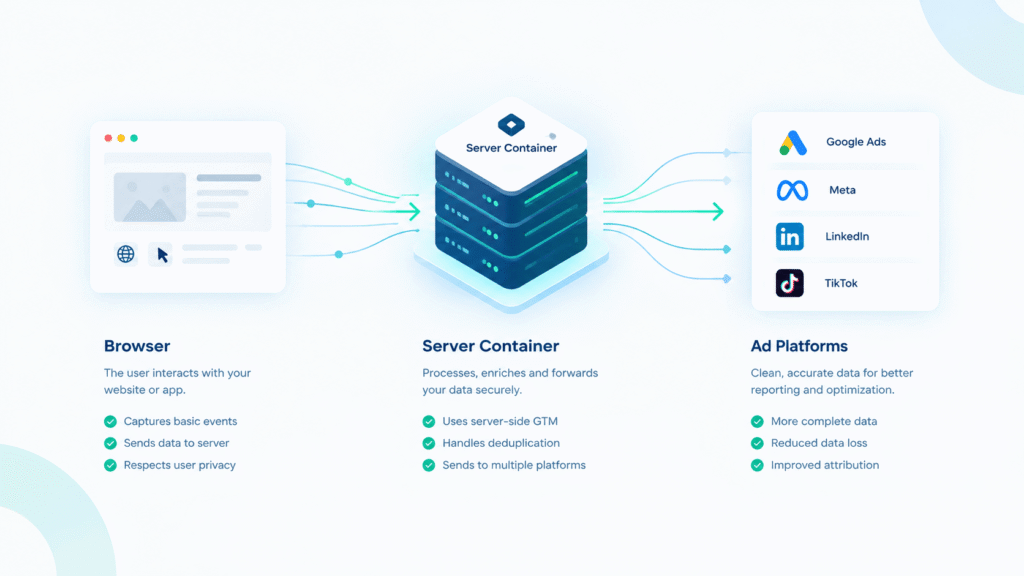
Instead of the browser sending data directly to Google, Meta, or other platforms, a server-side setup routes that data through a server you control (via a GTM server container) before forwarding it on. This is more resilient to ad blockers and browser restrictions, and it lets you control exactly what data is sent and when.
// IMPLEMENTATION ROADMAP
What Setup Involves
What Setup Involves-
Setting up a GTM server-side container (hosted on Google Cloud or a managed service)
-
Configuring a first-party subdomain so tracking requests come from your own domain rather than a third-party one
-
Migrating your key conversion events to fire server-side, with client-side tracking kept as a fallback during the transition
-
Testing to confirm data is deduplicated correctly between client and server events — this step matters most, since a poorly implemented migration can create the exact duplicate-tracking problem a Conversion Tracking Audit exists to catch
// DELIVERABLES
What You Get
What You GetA working server-side tracking setup, documentation of exactly what was configured and why (so you’re not dependent on me to understand your own tracking), and a verification report confirming conversions are being captured without duplication.
// CLEAR ANSWERS
Server-Side Tracking FAQs
Often yes — an audit identifies the problem; this is frequently the fix, particularly if the audit found conversions being lost to browser restrictions specifically.
A well-configured server-side container typically has minimal to no impact on site speed — this is checked as part of the setup and testing process.
Server-side setups need periodic checking as platforms update their APIs — this is why I offer optional ongoing monitoring rather than a pure “set and forget” handoff.
Yes, same underlying technology — the difference is this includes the strategy and verification work around it, not just the technical configuration.