
// conversion tracking & attribution audit
Why Your Ad Platforms and Your Bank Account Disagree
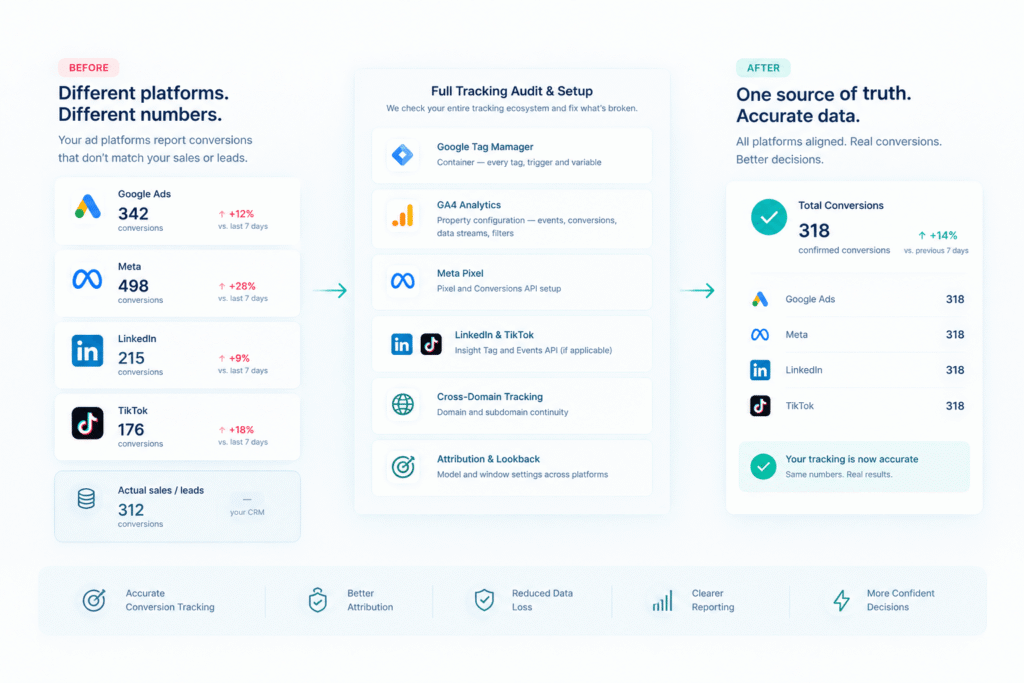
Google Ads says one thing. Meta says another. Your CRM says a third. Only one of those numbers is real, and most businesses never find out which. I go through your entire tracking setup — every platform, every pixel, every tag — and tell you exactly where the gap is coming from.
// WHY TRACKING BREAKS
What Usually Causes This
-
Duplicate tracking — the same conversion firing twice (once from a browser pixel, once from a server-side tag), inflating your reported numbers without anyone noticing.
-
Attribution window mismatches — Google Ads and Meta each count a “conversion” differently depending on the attribution window and model you’ve set, so the same sale can show up as two different numbers on two different platforms.
-
Broken or missing cross-domain tracking — if your checkout or lead form lives on a different subdomain, sessions can silently break, and conversions get attributed to “direct” traffic instead of the ad that actually drove them.
-
Bot and internal traffic inflating the numbers — without proper filtering, your own team’s visits and automated bot traffic can be counted as real engagement.
// AUDIT SCOPE
What the Audit Covers
-
Google Tag Manager container — every tag, trigger, and variable
-
GA4 property configuration — events, conversions, data streams, filters
-
Meta Pixel and Conversions API setup
-
LinkedIn Insight Tag and TikTok Events API, if applicable
-
Cross-domain and cross-subdomain tracking continuity
-
Attribution model and lookback window settings across platforms
// DELIVERABLES
What You Get
What You GetA written report, in plain English, covering exactly what’s broken, how much it’s likely affecting your reported numbers, and a prioritized list of what to fix first. No 40-page deck full of screenshots you’ll never open — a document you can actually act on, or hand to a developer to implement.
// TRANSPARENT PRICING
What This Costs
The initial 15-minute health check is free. If there’s real work to do, I’ll tell you exactly what the full audit costs before starting — no surprise invoices.
// SERVICE FAQs
Conversion Audit Questions
The health check is 15 minutes. A full audit report typically takes 3 business days once I have access to your accounts.
Read access to Google Tag Manager, GA4, and whichever ad platforms you use — never admin or billing access, just enough to review the setup.
I’ll tell you that directly, in writing. You’ll have paid for certainty instead of hoping your numbers are accurate.
Both are available — the report is yours either way, and you can choose whether you or I implement the fixes.
Yes — a Google Ads audit typically looks at campaign strategy, bidding, and creative. This is specifically about whether the numbers being measured are accurate in the first place, regardless of who’s running the campaigns.